A list of my favourites and must have cydia tweaks & utilities that you might not even know.
I didn't add SBsettings due to its battery drain.
To get most of these apps add this source http://cyda.xsellize.com/
Notsosmartphones
How to download free music on iPhone,iPod Touch and iPad without itunes sync.
Requires jailbreak
No computer imports straight to music library
The source is http://ihacksrepo.com
For education purposes only
iAnime is the must have app for entertainment lovers and cartoon fanatics.
They have a wide variety of shows and is sure to have one of your favourites and even if they don't you can request for the kind of shows you want.
This currently only supports IOS but soon other devices will be added.
Best of all its free.
Point your devices browser to http://iani.me/
If you like their work please support them by Donating.
Any amount shows gratitiude.
Pocket Piano is a virtual piano with the rich sound and versatility of the real thing. With great features like multitouch, high-quality sound, two full octaves of notes, and recording, you can impress your friends and play your favorite tunes anywhere you go. Features: -High Quality Sound -Quick Responsiveness -Optional labels for keys - Keypad support -Easily shift keys up or down quickly while playing -Record your performances for playback later.
For Symbian download here
For iPod & iPhone download from installous
If you live in Ireland and have a mobile phone, you automatically get at least 250 free webtexts each month from your provider (e.g. O2, Vodafone, Three, Meteor). And if you live outside Ireland you can easily set up a free account with any of our 50+ supported providers and avail of the lowest international SMS rates.
Jelly SMS lets you to send SMS text messages internationally, giving you the convenience of not having to log into your provider website each time you want to use your webtexts. All this while lowering your monthly phone bill!
Jelly SMS looks after all this for you, in one tidy little app that runs on your iOS or Android device, and also on your Mac OS X, Windows or Linux desktop computer.
To download visit the appstore and Android market.
So Opera Mini is ready to chime in and sing harmony when you are on a slow connection, crowded network, paying per megabyte for browsing, or simply want to save time and money.
Have an iPhone 4? Our browser adapts to the high resolution and changes the user interface to accommodate the screen size. How about iPad? Yep, the Opera Mini 6 browser will switch to a more convenient view for tablet handling.
The chorus of Opera Mini users gave feedback and we listened. Like the rest of the Opera Mini 6 lineup, the iOS version features:
-Much faster and smoother panning and zooming that lets the user get all the way into the details of every page, in one smooth motion
-Share buttons to share the love for a site to your friends on My Opera, Facebook, Twitter or vKontakte right from the Opera Mini 6 browser
-New jazzed-up skin and redesigned Opera menus Backstage,
Opera’s engineers have tuned the browser and created a faster and more fluid user experience. Scrolling and panning are ultra fast, even on the largest webpages, for instant access. On iOS, the Opera Mini 6 browser is submitted as a single download for all iOS devices. Download from here
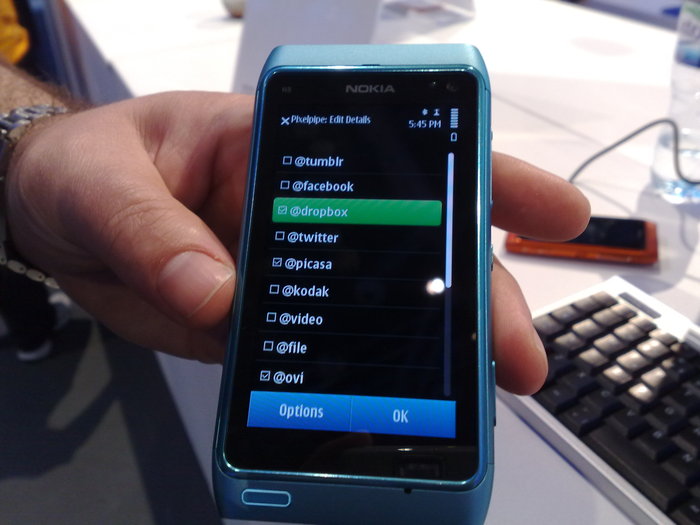
''Upload photos, video, and audio files easily through Pixelpipe and distribute your content to social networks, photo/video sites, blogs and online storage services.''
Fast & Free
Wide array of pips to connect to (Facebook, YouTube e.t.c)
Solution to uploading hd vids from iPhone/iPod touch
Works without internet until network is gotten
Available on iPhone,Android,Symbian,Palm pre or Desktop e.t.c
With your symbian device you might have noticed that it cant open zip files instead you rely on your computer,not any more.This app opens your files with ease.
Remember here at notsosmartphones there are apps for everything you just don't know it yet
Download Zip manager.
The best desktop for Nokia phones. The most popular soft in local forum which is referred to as " the best desktop" and downloaded over 100000 times. Most smooth desktop! Most personalization options desktop! Most pretty and popular desktop! Most stable desktop! Least ram consuming desktop! Least storage consuming desktop! ... Many improvements made compared with previous version! Get organised and stop waisting time waiting for your phone to load all your apps ,It's incredibly fast.
Before we start you must sign up and follow this previous tutorial please go through it to sign this unsigned application and install it in your phone
Now that you have signed up to opda,here comes the hard part you need a software called Helloox.
For hacking you will need to sign this application called Helloox 2 for one last time.
download helloox.
The earlier version of Helloox requires ROM patching. You don’t have to worry anymore as the latest version does everything automatically. Once installed, you will see the following processes one after another as in the screenshots below and you are done.
When Nokia’s first Symbian Smartphone,7650 was launched it doesn’t require signing to install applications. As a result of which, it was more prone to virus attack.There was no need of signing applications for installation till Symbian S60v2. Since, S60v3 Nokia took this initiative as a security measure. By applications i mean all type of .sis and .sisx files, which includes softwares, games and themes.
Nokia 5530,5800,5230,C6 e.t.c is based on Symbian S60v5 OS, so it requires signing. If an application is already signed you will be able to install it, otherwise you will receive this error message “Certificate error, contact application vendor”. Initially the signing process was very cumbersome but now simpler online methods are available.
In this tutorial i will show you how to sign unsigned applications online in a few simple steps -
1. Open this URL in your web browser http://cer.opda.cn/en.You will see register on top right of you screen as in the above screenshot. Register and then login to your account.
2. After logging in click on “Sign Software” as in above screenshot. There you will see “Apply Cer”.Click on it.
3. It will take you to the above screen. Enter your model number i.e 5530. The Phone number should start with 134 or 135 and it should be 11 digits other wise you will get error. Check your phone’s IMEI number by typing *#06# on your phone’s virtual keyboard .”Remarks” is just for your reference. After applying you have to wait for 24 hours.
4. After 24 hours when you will click on “Apply Cer”.You will see 3 new options as Signing Software, Cer and Key. Click on “Signing Software” and it will take you to upload screen. You should also save “.cer” and “.key” file. In the next tutorial i will show you how to sign applications directly from your phone using these files.
5. Here you can upload the unsigned software.Enter anything in “Remarks” field for your reference and click on Upload.
6. After uploading successfully you will see the above screen. Download the signed application it is ready for installation on your Phone.
The first 4 steps you have to perform for the first time only. After wards you can just login and upload any unsigned software to get it signed.
The process is easy, but if you face any difficulty feel free to ask through the comment form given below.
Don't be discouraged by the photo Fring brings free communication to all platforms.Nokia,Apple,Android,Samsung,e.t.c the list goes on and on.
''fring™, a free mobile internet service & community , that enables its users to talk & interact with other fringsters™ and their online communities, from their mobile phones.
connect to Skype, Google Talk, MSN Messenger, ICQ, Twitter, Yahoo!, AIM & SIP contacts from anywhere.
fring is a revolutionary mobile application that allows you to chat via your handset’''s Internet connection (GPRS, 3G or Wi-Fi) to other fring users and PC-based VoIP applications such as Skype, ICQ, Google Talk, MSN Messenger, Yahoo!,AIM & SIP, leveraging your 3G data-plan or Wi-Fi hot-spot connection instead of costly airtime minutes. fring is also enhanced with real-time contact availability (presence) so you can see who is avaiable before dialing.
Why use fring?
gain true mobility with your Skype, ICQ, MSN, Google Talk, ,Yahoo!,AIM & Twitter contacts on your mobile you'll stay connected wherever you go
presence status for all of your contacts and know who's online before dialing!
Leveraging the power and freedom of the Internet from your phone, fring empowers users to communicate without operator, network or physical boundaries.''
5 very good reasons to adopt the best mobile mail:
1.Better.Because you now only have one single feature to manage your attachments - download. You wait to receive, forward and send heavy emails - and pay. At best you can open a heavy image, PDF or Office document.
2.Instant. We stream your documents. No wait. Heavy stuff becomes light as feathers. View and read without any download. Digest and act instantly with high-quality responses. At ease, add any attachment.
3.Secure.No download means no sensitive documents on your device that can get lost, or stolen. Strong encryption secures your connection and protects your email and documents integrity.
4.Easier.Single clicks get stuff done. As one beta tester expressed it, »I just wish email was just as easy on my PC.«
5.Nicer.Well, thumbnails, previews, page flickering, zooming, viewing and reading - all served to your finger-tips at will - offers an entirely new and much richer experience. Mobile Documents brings the desktop experience to the mobile.
To download visit here for S60^3,S60v5,S60v3,.
A Phone is not a Smart Phone if it can't entertain you and smart movie does just that.
It does it all
Smartmovie plays anything and everything you name it plays it from avi. to mpg.
Looks great also
It uses a very simple user interface which changes to match the theme of your phone
Easy to use
The settings are fully customizable toyour viewing pleasure and no you don't have to be smart to use this app.
This works on all S60^3 ,S60v5/s60v3, and some Samsung phones .Visit the link below for a full list.
The lite version though has a time limit but however it truly is a brilliant app.I have even tried to play a avi video on it and it worked perfectly.The phone's default player doesn't even play it just to show the comparison.Yeah there are other players out there e.g July player,UC player e.t.c but this is The King.Don't delay and start watching full length movies on your Smartphone today.
All smart phones require a decent browser.Opera mini does just that, it is fast,reliable and works on a wide range of devices.Try it today.
"Speed through the Web
The fastest browsing experience available for your phone or tablet—Opera’s rendering speed and efficient controls put it ahead of other browsers.
Browse with ease
Surf the Web on mobile devices as easily as on a desktop computer. Whichever phone or tablet you have, a smooth user experience awaits.
Save Money
Save money on mobile data plans by taking advantage of Opera’s compression technology to reduce data costs by up to 90%.
Features
Your data, wherever you need it
Backup your bookmarks, Speed Dials, and search engines to My Opera, and keep them synchronized between different phones or with the Opera browser on your desktop computers or laptops. With Opera Link, you can take your favorite websites with you, wherever you go.
Share the best of the Web
When you come across a page that you want to show to the world, just tap the “Share” icon from Opera's menu. Then choose from social networks such as Facebook, Twitter, vKontakte and more to share a link in a snap.
See what you are looking for
Finding what you are looking for in text-heavy pages on your phone has never been as easy. As you type, the Opera browser finds your search term and highlights all occurrences in the page, allowing you to cycle through them.
Manage your downloads
Opera's Downloads feature is the most advanced download manager available for mobile phone, built right in to the browser. Start downloading files and keep track of their progress from Downloads. You can pause downloads, when necessary, and resume them when it is convenient.
Easy access to your bookmarks
Save, edit and organize bookmarks into folders. Sophisticated bookmark management lets you keep track of many sites. Enabling Opera Link can even keep bookmarks synchronized across the Opera installations on other devices, such as your computer, so you always have your links when you need them.
Go back in time
With Opera’s history feature, you can find pages you visited before. Visited pages in your history are grouped by date, so you can easily find a site by the day you have viewed it.
Read a page any time, from anywhere
When you find a page that you would like to keep, use Opera’s Save Page feature, and you can access it any time, without having to wait for it to download even with no Internet connection."
So you don't have a smartphone or maybe your lucky enough to have one. We are here to provide apps, games, tutorials, reviews, news and much more. Stay tuned . We're coming.